Privately connect to any service without joining the whole network.
Reach APIs, databases, and devices in remote and on-prem networks straight from your own cloud, cluster, or laptop.
A VPN alternative with no firewall rules and no flat networks.
Available today with ngrokd. agent v4 is coming next.
Publish, consume, and route without public URLs or open ports.
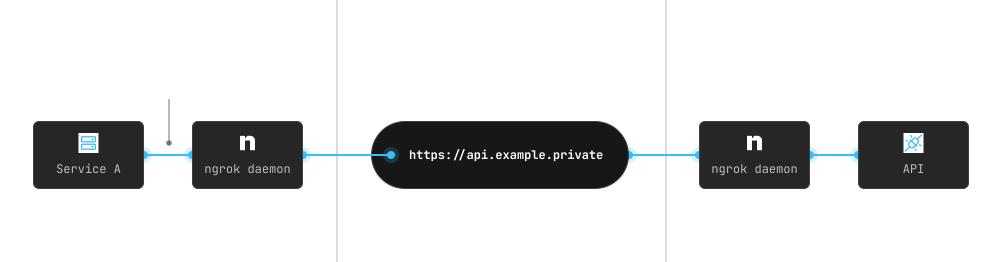
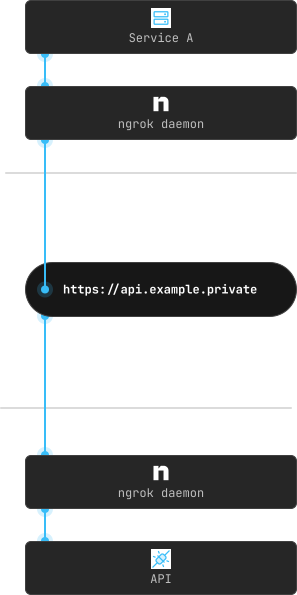
Publish a private endpoint: The ngrok daemon runs alongside the remote service and publishes it. It connects outbound-only on port 443, so there are no inbound ports or firewall rules to open.
Consume it on your local network: The ngrok daemon maps the private endpoint to a local IP. Your apps connect like it's on the same network: curl, psql, whatever they already use.
1on_http_request:2 # route /api prefix to the API service3 - expressions:4 - req.url.path.startsWith('/api')5 actions:6 - type: forward-internal7 config:8 url: https://api.internal9 10 # route by subdomain to matching service11 - actions:12 - type: forward-internal13 config:14 url: https://${req.host.split('.')[0]}.internalTraffic Policy at the ngrok cloud dynamically routes between private endpoints, rewrites URLs, adds headers, and load balances across replicas.
Application code on either side stays untouched. Go from one customer to many by adding endpoints—no config changes, no coordination.
Private connectivity for every pattern.
You don't adopt a new tool for each pattern.
One daemon handles the customer network, edge device, and remote cluster the same way.
Connect to services in customer networks
Your customers run a lightweight daemon. Their services become privately reachable from your network without a VPN to debug or a firewall to open. Onboard new customers in hours, not weeks.
Connect to edge devices
Deploy the daemon on field devices like kiosks, controllers, and retail hardware. Each one publishes a private endpoint, so your cloud connects without inbound ports or static IPs.
Connect across clusters and clouds
The Kubernetes Operator projects private endpoints into another cluster as native Services, with standard DNS and discovery. Your hybrid cloud apps never know they're crossing boundaries.
Share what's running locally
A developer runs the daemon on their machine. Their service is privately reachable by teammates and CI, no deploy required. Stop the daemon and the endpoint disappears.
Why ngrok?
Private without the infrastructure. Skip the VPN servers and WireGuard configs. The daemon connects outbound and is reachable from your network alone.
Works across every boundary. Same daemon, same model: a customer's cloud, an on-prem datacenter, a k8s cluster, or a Raspberry Pi.
Scales without scaling complexity. One private endpoint or a thousand, no new VPN tunnels. Add a service on one side and it appears on the other.
Private connectivity that passes enterprise security reviews.
The ngrok daemon already delivers private connectivity in healthcare systems and high-security data centers.
Service-level access, not network-level
Each daemon can reach only the specific services you grant it, never the whole network. If an attacker compromises one, they still can't move to anything else.
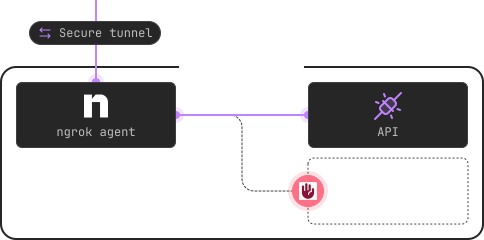
No public attack surface
Private endpoints use non-routable IPs and DNS names—nothing to discover, scan, or enumerate.
mTLS on every connection
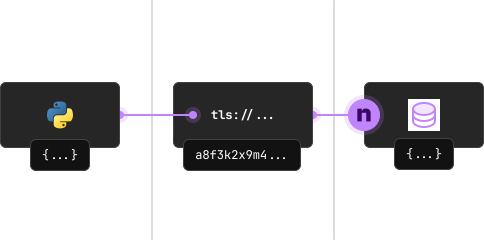
Mutual TLS with automatically provisioned certificates. Keys are generated locally and never leave the machine.
Least-privilege credentials
Auth tokens define exactly which endpoints a daemon can publish or consume. Strict isolation across customers and environments.
Data stays where you need it
Pin traffic to specific ngrok regions to meet data residency requirements.
End-to-end encryption with your keys
Terminate TLS at the remote service or the daemon itself. ngrok relays ciphertext and never decrypts your traffic.
All the boxes you need to check
Everything you need to ship private connectivity at scale.
Kubernetes-native
Manage private endpoints declaratively with the ngrok Operator and CRDs. Remote services appear as native k8s Services with DNS, discovery, and load balancing built in.
Auto-discovery, zero maintenance
Daemons pick up new endpoints automatically. Publish a new service on one side and it's consumable on the other within seconds.
Automate everything with APIs
Manage credentials, create endpoints, and modify traffic policies programmatically with ngrok's platform API. Go from one customer to one thousand without manual setup.
White-label everything your customers see
Brand your URLs, daemon binaries, and connect addresses with your own domains. Assign dedicated IPs. Your customers see your brand, not ngrok's.
The firewall ticket can wait.
You don’t have to.
Install the daemon, publish a private endpoint, and connect. Free to start, and no sales call required.